BUYER'S GUIDE

How to choose an eTMF system

A practical guide for clinical teams

Chapter 1

What is an eTMF?

An Electronic Trial Master File is a specialized content management system used to manage clinical documents across the life cycle of a clinical trial.

eTMF systems help you maintain compliance with regulatory agencies. They also give you a historical record of the events that took place over the course of a clinical trial. 

Regulatory documents used to be paper-based, stored centrally in physical file cabinets. Electronic systems changed that, and eTMF systems now have widespread adoption across the industry. 

No two eTMF systems are identical. The features below are grouped into seven functional categories. Within each, basic features cover what every eTMF should do. Advanced features show what separates a mature system from a basic one.

eTMF features by category

eTMF feature by categories divided by type of advanced features

Document management

Basic

Uploading and Creation. Records enter your eTMF through user uploads, in-system creation, or email.
Indexing. Indexing adds unique identifiers to each record, so you can retrieve it fast and run efficient workflows.
Classification. Your eTMF should route each record into the correct classification automatically, based on your file plan.
Storage. At minimum, your eTMF should store records and manage where and how long they're kept.
Versioning. Your eTMF should track every change to a record: who made it, when, and what changed, with a clear distinction between drafts and final versions.

Advanced

Process management and workflows. A modern eTMF lets study staff, site personnel, and monitors upload directly into the system, or route work through a staging area for centralized processing.
Structures and taxonomies. Structuring content into a clear taxonomy makes large volumes of data easy to find and retrieve later.
Bulk upload and tagging. Teams handling hundreds of records per study need a way to upload and tag many records at once, not just one at a time.
OCR and full-text search. Optical character recognition lets you search inside scanned PDFs and attached records, not just their titles and tags.
Automated QC and approval workflows. Customizable routing handles creation, peer review, and final approval, with automated task alerts so nothing sits waiting on one person.

Metadata and search

Basic

Metadata. Metadata is the information attached to each record, like a library catalog card. It captures the author, upload date, and status.
Search and retrieval. Your eTMF needs a minimum capability to search and retrieve records using both structured and unstructured tools.
Expected record list. Your eTMF needs a way to define which records a study requires, mapped to a reference model like the CDISC TMF Reference Model.

Advanced

Configurable and dynamic metadata. Advanced metadata is configurable, not fixed. It supports search, workflows, and automation across large parts of your TMF process.
Full trial master file search. Search sophistication depends on how well your content is classified and how comprehensive your metadata is.

Emerging

AI-assisted indexing and search. Machine learning can suggest the right record type and metadata fields as you upload, and surface relevant content faster than keyword search alone.
Conversational search. Natural-language queries let a trial manager or inspector ask something like “find all approved protocol amendments for Site 102 with missing signatures,” rather than building a filter manually. This searches the actual content of a document, not just its title.

Compliance and security

Basic

Comprehensive security. A good security model grants access to complete or partial TMFs, and logs who accessed what and when.
Record quality control. Your eTMF must support ongoing QC of every record you upload, so each one meets ALCOA++ requirements: attributable, legible, contemporaneous, original, and accurate, plus complete, consistent, enduring, available and traceable.
Auditability. Your eTMF should provide full, time-stamped, non-editable audit trails tracking who created, viewed, edited, approved, or deleted every record.

Advanced

Customizable user roles and permissions. With multiple studies running at once, you need clearly defined user roles per study. Granular permissions show each person only what they need.
Robust access controls. Beyond basic security, this means fine-grained control over who can view, edit, or approve specific areas of the TMF.
Part 11 and Annex 11 compliant eSignatures. Your eTMF needs a validated eSignature tool that meets 21 CFR PART 11 and EU Annex 11 requirements, with authentication strong enough that digital records are legally binding and tamper-evident.
Vendor validation documentation. Ask your vendor for GAMP 5 aligned IQ/OQ/PQ documentation. Building this validation package yourself is expensive.
Blind and unblinded content segregation. Randomization lists, investigational product pharmacy logs, and other unblinded content need strict access isolation, separate from general study access, so the study's integrity isn't put at risk.
Inspector and auditor portal access. A dedicated, restricted, read-only environment lets FDA, EMA, MHRA or internal auditors navigate, search, and review records directly during an inspection, without needing a guided walkthrough from your team.

Emerging

Automated Pre-QC checks. AI can scan incoming records for missing signatures, expired dates, or formatting errors before they reach human QC, and flag or redact patient-identifiable information before a file is committed to a general folder.

Reporting and business intelligence

Basic

eTMF reporting. At a baseline, your eTMF should give basic business intelligence on TMF completeness and flag missing records for audit readiness.

Advanced

Real-time completeness tracking. A live, drillable view of TMF completeness by study, country, or site shows what's filed and what's missing without running or waiting on a report.
Detailed reporting and KPI tracking. Timeliness trends, rejection rates, and full audit trail activity typically arrive as reports rather than live views, even in mature systems. Ask vendors whether these come as exports or as part of a live dashboard, since the two don't always match.

Risk and oversight

This category has no basic tier. Risk-based oversight is what ICH E6(R3) now expects, and it's a mark of a mature system rather than an entry-level one.
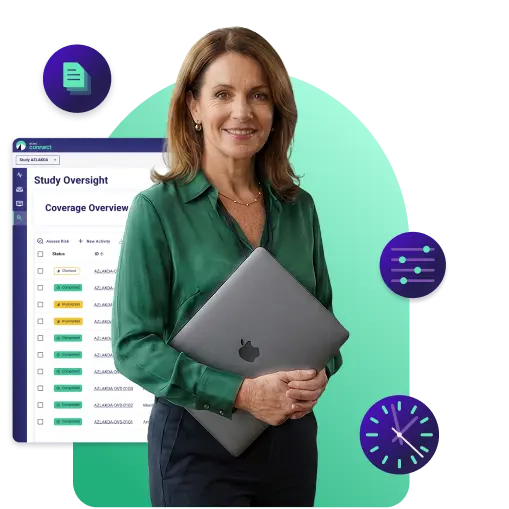
See how a risk signal turns into a documented, trackable decision in your TMF.

Explore the feature
an expert holding a computer with eTMF Connect dashboards in the background

Advanced

Risk-based oversight. ICH E6(R3) puts a stronger emphasis on risk-based, proportionate oversight. Ask vendors how they support risk scoring and demonstration of oversight, not just record management.
Risk-based QC sampling. Instead of reviewing every record at the same depth, the system applies risk rules to prioritize high-risk record types, like informed consent forms or safety notifications, for full review, while sampling lower-risk record types more lightly.

Emerging

CRO and third-party oversight. Cross-entity audit trails track actions from external CROs and vendors alongside your internal team in a single timeline. Sponsor oversight dashboards measure CRO turnaround time, rejection rates, and filing backlogs against agreed service levels.
Predictive completeness forecasting. The system cross-references CTMS milestones, like site initiation or first patient in, against the Expected Record List to flag missing records before a milestone is officially reached. Burn-down charts track documents approaching expiration.
Vendor and site risk profiling. Historical compliance data across studies scores site or CRO risk levels, so you can direct extra quality resources to sites or partners with a track record of delays or errors.

Integration and exchange

This category has no basic tier. These capabilities either exist in a mature form or don't exist at all, which makes them a strong differentiator when comparing vendors. It splits into two distinct needs: connecting to your broader clinical operations stack, and automating document exchange with external parties.

Advanced

Clinical operations stack integration
eTMF integrations or Open API access. Evaluate how well your eTMF exchanges information with other systems you use.
CTMS integration. Connecting your eTMF to a clinical trial management system avoids duplicate data entry and keeps study milestones aligned.
EDC integration. Clinical data stays in the EDC. What flows to the TMF is data management and statistics documentation, like the DMP, SAP, eCRF specifications, and database lock records, plus EDC compliance evidence such as user access lists and validation documentation. Ask whether the vendor can reconcile across systems, for example flagging subjects consented against a superseded ICF version.
eQMS integration. Linking to a quality management system connects quality events, like CAPAs, directly to the TMF.
Record exchange. Record exchange covers automated document handoff with external parties, from site file reconciliation to study closeout exports.
Investigator Site File (ISF) Reconciliation. Your eTMF should let you cross-reference and reconcile the ISF against the TMF.
TMF export and content exchange. Support for the eTMF Exchange Mechanism Standard lets you export content and metadata from one system and import it into another easily.
Export and archival support. At study closeout, your eTMF should export the complete file, including folder hierarchy, metadata, and audit logs, in standard formats.
Data residency and hosting location. Global trials often need documents stored in specific regions for legal reasons.

Emerging

Site exchange integration. Automated record exchange between a site's eISF and the sponsor's eTMF removes duplicate uploads, and is distinct from reconciling the two after the fact.

Access and records management

This category also has no basic tier, for the same reason as Integration and Exchange.

Advanced

Email and correspondence management. Some correspondence must be retained and filed as part of your final TMF. Your system should recognize and manage these critical items automatically.
Investigator site portal access. Sites need a way to upload and view their own documents without getting full access to the sponsor's TMF.
Mobile and offline access. Monitors doing site visits need to view and sometimes upload documents without a reliable connection.
Records retention and disposition. Your eTMF should support long-term archival, legal hold, and defined disposal rules once retention periods expire.
Configurable study and TMF planning. No two studies expect the same documents. A configurable file plan lets you build template file plans study by study.
What this means
We're witnessing a collective holding pattern. The industry believes in AI's potential but is waiting for someone else, namely, regulators, industry leaders, and peers, to move first. 

Get the complete report in a streamlined format built for easy reading and sharing.

Get the PDF version
How to choose an eTMF system pdf visual
Chapter 2

Signs your current system is no longer working

Signs your current system is no longer working

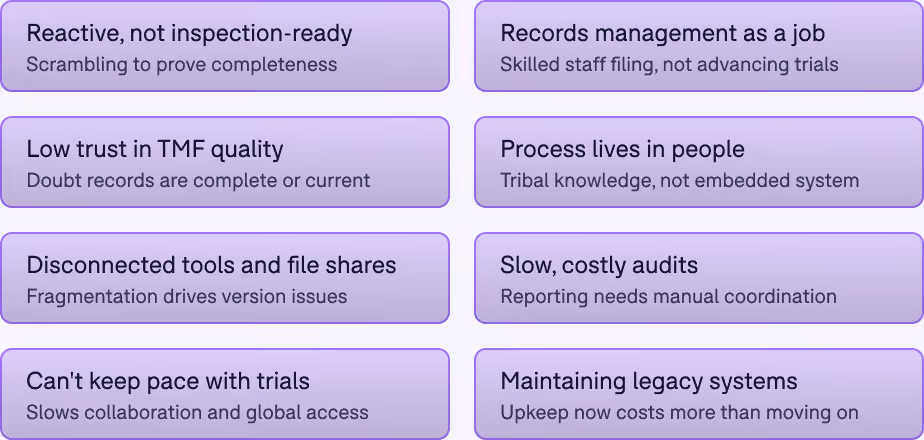
Most teams don’t wake up one day and decide to replace their TMF. It’s usually a slow realization—friction builds, risks increase, and what once “worked fine” starts holding the organization back. If any of the following sound familiar, it’s a strong signal your current TMF approach isn’t keeping up:

You’re constantly reacting instead of being inspection-ready
If inspection readiness still means a last-minute scramble—chasing records, reconciling versions, or manually proving completeness, your TMF isn’t doing its job. A modern TMF should demonstrate compliance in real time, not require heroics under pressure.
Your team spends more time managing records than advancing trials
When highly skilled teams are stuck filing, searching, renaming, and cross-checking records, productivity takes a hit. If records management feels like a full-time job, your system is creating drag instead of enabling progress.
You don’t fully trust the quality or completeness of your TMF
If there’s lingering doubt about whether records are missing, outdated, or incorrectly filed, that’s a risk issue, not only an operational inconvenience. Lack of visibility and control is one of the clearest signs your TMF isn’t fit for purpose.
Processes live in people, not in systems
If your TMF relies on tribal knowledge—manual checklists, workarounds, or “the way we’ve always done it”—you’re exposed. Scalable organizations embed quality and process directly into their systems, not individual memory.
You’re stitching together disconnected tools and file shares
When your TMF exists across shared drives, email threads, and multiple systems, you’re managing chaos. Fragmentation leads to duplication, version control issues, and increased compliance risk.
Audits and reporting are time-consuming and expensive
If pulling reports, tracking metrics, or supporting audits requires manual effort and coordination across teams, your current setup is costing more than it seems. Modern systems turn reporting into a byproduct, not a project.
Your systems can’t keep up with the speed of your trials
Clinical operations are moving faster than ever. If your TMF slows down collaboration, limits access, or struggles to support remote and global teams, it’s no longer aligned with how trials run today.
You’re maintaining legacy systems that no longer deliver value
If your organization is investing time and resources into maintaining outdated systems—or trying to consolidate tools just to stay efficient—it’s a clear trigger to reassess. At some point, maintaining the old becomes more expensive than moving forward.
What this means for your team
If your TMF creates friction, uncertainty, or risk, it’s no longer just a system problem—it’s a business problem. Recognizing these signals early is what separates organizations that stay inspection-ready from those that are always playing catch-up.

eTMF Connect gives you a real-time completeness view, replacing last-minute scrambling with steady inspection readiness.

Talk to our team
A clinical expert reading her eTMF Connect dashboards on her computer
Chapter 3

Selecting the right eTMF system and vendor

How do you decide which eTMF software to purchase?

Everyone wants the tool that will solve every problem quickly. Before selecting an eTMF system, and ultimately an eTMF vendor, it's important to understand the full picture of your organization and your top priorities.

Look at the individual needs of your stakeholders, the processes you have in place, and your budget. Once you've done that, you're ready to evaluate the options on the market today.

To get started, here are some prep questions to work through with the team:

  • What are the primary business objectives for adopting a new eTMF solution?
  • Do we have specific business requirements for a new solution?
  • At first glance, how thoroughly does the solution meet our defined needs?
  • Is the solution used and endorsed by our peers?
  • Can we get a personalized demonstration of the solution?
  • What is involved with implementation of the solution?
  • Does the solution integrate with our existing systems, if necessary?
  • What is the Total Cost of Ownership (TCO) for the solution?
  • What ROI (Return on Investment) can we expect from adopting this solution?

Determining your eTMF needs and requirements

Making the decision to select new software for your organization is no small task. While it's easy to get excited about the potential benefits a new software could bring, selecting software systems without the proper planning, and defined criteria for evaluating and selecting a system, can lead to oversights and bad investments. This section will outline some key steps and important advice when you are looking to implement an eTMF at your organization.

Start defining your requirements

Prior to even looking at available eTMF system options, make sure you thoroughly define your needs and requirements. Life sciences organizations for the most part are process-driven, they receive vast amounts of information and content on a daily basis, and are responsible for complex business processes that have ethical considerations as well as regulatory requirements.

Technology can facilitate the way your organization manages these processes, but it doesn't take your requirements and needs into account on its own. This is why defining your requirements is a critical step.

Step 1: Assemble a vendor selection team

Defining your requirements begins by assembling a vendor selection team. Their responsibility is selecting the right eTMF system for your organization.

Select individuals who have a shared interest in the vendor selection process, along with expertise and understanding of the area of the business the software will support.

Step 2: Begin developing system requirements

There are numerous ways to prepare these requirements, such as use cases. Just remember, the goal at this stage is to be able to clearly communicate your needs to the potential vendors, and have a baseline to evaluate the options that will present themselves.

Don't aim to produce a detailed system requirements specification for a development team at this stage. The most common mistake at this step is designing the system instead of defining the business needs. Write requirements with your users in mind.

Below is an example of how you can write clear vendor requirements. You should stay business-focused, keeping away from system design:

The first task of the vendor selection team is to review the high-level features needed for the eTMF system, and to produce a set of requirements by gathering additional information from stakeholders.
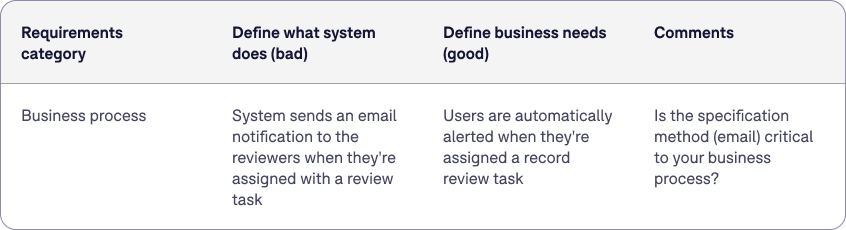
Requirements category for what defines a system
Don't over-engineer your requirements

Keep your list simple. Don't worry about formally categorizing requirements as functional versus non-functional. That structure belongs in validation, later.  

What matters now is capturing the full picture: what the system needs to do, and everything around it.

Things like availability, security, backup and disaster recovery, and data export at contract end are better handled as questions you ask the vendor and terms you negotiate, not requirements you write. Ask for the evidence: SOC 2 or equivalent, DR test results, exit and portability terms. Get the commitments into the contract or terms and conditions.

A large list of detailed requirements works against you. You'll forgo solutions that would have met your business needs because they didn't fit the requirements filter you created upfront. A long, detailed list slows down the vendor selection process and limits your options.

If most out-of-the-box solutions don't meet your specific business needs, that's when custom development becomes worth considering, and that's when complete system specifications make sense, not before.

Requirements can include anything related to the product offering you're hoping to implement, well beyond functional and non-functional system requirements. Consider services (deployment, validation, migration, training, general support), supporting documentation (procedural templates, validation documents, training materials), and organizational characteristics (quality maturity level, industry expertise, geographical location).

Weighing your requirements

With a complete list of requirements on hand, you will need to assign the level of importance that each requirement carries. This can be done on a 1-2-3 scale: 1. Nice to Have, 2. Important, and 3. Critical to Operations.

Keep this determination to yourself. Don't communicate it to the vendor during the RFI (Request for Information) process, but have it determined before moving to the next step.

Where you’re starting from, and where you’re headed

Two organizations evaluating the exact same eTMF vendor can end up with completely different requirements, because their starting point and their growth trajectory are different. Before you build your requirements list, it's worth being honest about both.

Where you’re starting from

Never had an eTMF. Records live in shared drives, SharePoint, or paper files. Your priority is basic structure and compliance, not migration.
Replacing an existing eTMF. You already have workflows and user habits in place. Migration, change management, and minimizing disruption to ongoing trials matter more than raw feature count.
Bringing your TMF in-house from a CRO. You're taking on ownership and oversight responsibilities the CRO used to hold. Your system needs to support that shift, along with a clear handoff and reconciliation process against the CRO's existing records.
A CRO building its own eTMF. You need a system that can serve multiple sponsors with different requirements, standards, and access needs, not just one internal team.

Where you’re headed

Your requirements should account for where you'll be in two to three years, not just where you are today.

Team growth. A platform that works for a five-person clinical ops team may not scale to fifty. Look closely at user management, permissions, and training overhead as headcount grows.
Portfolio scale. Running one or two trials is a different problem than running twenty. Cross-study visibility, even if it's a Phase 2 capability for you today, is worth asking vendors about early.
Phase and therapeutic area complexity. An early-phase, single-indication sponsor has simpler record requirements than a multi-phase, multi-therapeutic-area portfolio. Your file plan complexity should track this.
Operating model. If you're moving from outsourcing to a hybrid or fully in-house model, or the reverse, your access control and oversight needs will change substantially. Choose a system that doesn't box you into today's model.

Why this matters most for growing organizations

A larger, established organization has usually already worked through these questions. A stable organization can often make do with what fits today. A growing organization is the one that feels the mismatch fastest, since headcount, trial volume, and complexity are all moving targets at once.

The temptation is to buy for today's needs, since it's simpler and cheaper in the short term. But an eTMF system isn't something you swap out casually once it's embedded in your process. Treat growth-path fit as its own requirements category, not an afterthought to features and price.

Think about the following requirement categories

Although we recommend staying away from detailed system specifications, we still suggest you develop a list of clear and verifiable requirements. Below are some categories worth considering as you define your future paperless system.

Process

Why it's important:
Your eTMF must support the actual clinical processes you run day to day, not a generic template.
What to avoid:
Choosing a system built for generic record management and force-fitting your clinical workflows into it.
Advice:
Map your current processes before evaluating vendors, so you can test their workflows against your actual operations, not just a generic demo.
QUESTION(s) to ask
What specific business processes will you be supporting? Record management, system change control, corrective and  preventive actions?

Reports

Why it's important:
Reporting is how you prove TMF health day to day, not just at audit time.
What to avoid:
Assuming every reporting need looks the same. Live completeness views and detailed KPI reports, like timeliness or rejections, often work differently even within the same system.
Advice:
Ask the vendor to separate the two in the demo: what's a live, real-time view, and what's a scheduled or exported report. Confirm which of your specific reporting needs fall into each category.
QUESTION(s) to ask
Which of your reporting needs require a live view, and which are fine as a scheduled or exported report?

Regulations

Why it's important:
Non-negotiable compliance requirements should shape your shortlist, not follow it.
What to avoid:
Assuming every vendor supports every regulation equally, without asking for evidence.
Advice:
Request the vendor's compliance documentation upfront, and confirm which regulations apply to your specific trials and regions.
QUESTION(s) to ask
What regulations is your system subject to? For example, 21 CFR Part 11, Annex 11, ICH E6, 21 CFR Part 820.

Standards

Why it's important:
Industry standards affect integration quality and what auditors and partners will expect.
What to avoid:
Overlooking standards until an inspection or partner audit surfaces the gap.
Advice:
Confirm which standards are certified versus self-declared, and ask for supporting documentation, like audit reports.
QUESTION(s) to ask
What standards must your system meet? For example, ISO 9001:2015, SOX, GAMP 5.

Integration

Why it's important:
A system that can't talk to your other tools creates duplicate work and data drift.
What to avoid:
Treating integration as a nice-to-have that gets deprioritized until after go-live.
Advice:
List every system that needs to connect before vendor conversations start, and test integration claims with a real data sample during evaluation.
QUESTION(s) to ask
Are there other systems your new system must integrate with? How should they integrate?

Support

Why it's important:
The support model determines how fast you can resolve issues that block your team.
What to avoid:
Vendors whose support tiers don't match your team's actual working hours or urgency needs.
Advice:
Get support SLAs in writing, including response times by severity level, before signing.
QUESTION(s) to ask
What type of support do you expect? Will you need a help desk you can interact with directly?

Documentation

Why it's important:
Training materials and validation documentation determine how fast your team gets productive and stays compliant.
What to avoid:
Assuming the vendor will hand over complete documentation without confirming it upfront.
Advice:
Ask for sample training materials and validation documentation during evaluation, not after signing.
QUESTION(s) to ask
Will you need training documentation, user guides, deployment guides, or validation scripts? Do you have the procedural controls in place to manage the system post go-live?

Migration

Why it's important:
Moving your existing records in correctly is one of the highest-risk parts of any implementation.
What to avoid:
Underestimating migration time, or assuming standard vendor tools will handle your specific data formats.
Advice:
Run a migration pilot with a small, representative data set before committing to a full migration.
QUESTION(s) to ask
Will you need to migrate existing records? What are the data sources and formats for those records?

Expandability

Why it's important:
Features you don't need today may become essential as your organization grows.
What to avoid:
Locking into a system that can't add capability without a full re-implementation.
Advice:
Ask for the vendor's product roadmap and how add-on features are priced, not just what's available today.
QUESTION(s) to ask
Is the eTMF required to support other feature areas you might want later, like training or CAPA management?

Language

Why it's important:
If you're running multi-region trials, multilingual document support may matter more than an English-only interface.
What to avoid:
Confusing document-language support with interface-language support; they aren't always the same capability.
Advice:
If language is a factor for you, consider testing the system with actual foreign-language documents during a demo, rather than relying on the vendor's stated language list.
QUESTION(s) to ask
What languages, if any, does the system need to support? Is document-language support enough, or does the interface need to match user preferences too?

User base

Why it's important:
Your system needs to handle the actual mix of internal and external users you'll have, not just a headcount number.
What to avoid:
Underestimating the complexity of managing external users, like CROs and sites, alongside internal staff.
Advice:
Model your expected user count, including external users, and confirm pricing and permission structures scale accordingly.
QUESTION(s) to ask
Will you support remotely dispersed users, and how many? Will you manage both internal and external users?

Partnership

Why it's important:
You'll work with this vendor for years, not just through implementation.
What to avoid:
Choosing based on the product demo alone, without evaluating whether the vendor operates the way your organization does.
Advice:
Talk to existing customers about the relationship, not just the product, to gauge whether the vendor is a true partner.
QUESTION(s) to ask
Are you looking for a long-term partnership or a deliver-and-go vendor? What characteristics matter most in your next technical partner?

Product Maturity

Why it's important:
A newer product may offer innovation; an established one offers a proven track record. Neither is automatically the right answer.
What to avoid:
Assuming newer always means better, or assuming established always means best fit.
Advice:
Weigh maturity against your risk tolerance. Balance the appeal of newer capabilities against the assurance of a wider, existing user base.
QUESTION(s) to ask
How long has this product been available, and how large is its user base? Are you willing to be an early adopter, or do you want something widely used already?

Adaptability

Why it's important:
Your dependency on the vendor for ongoing changes affects your long-term flexibility and cost.
What to avoid:
Choosing a proprietary system without understanding how locked in you'll be.
Advice:
Ask what happens if you want to leave. A vendor confident in their product will have a clear exit story.
QUESTION(s) to ask
Is it acceptable to remain dependent on your vendor for updates, or will you eventually want to manage them yourself? Is the system built on widespread, adaptable technology?

Deadline

Why it's important:
Your implementation timeline affects which delivery model is realistic.
What to avoid:
Committing to a timeline before understanding how long your chosen delivery model actually takes.
Advice:
Align your delivery model choice with your actual deadline constraints, not the other way around.
QUESTION(s) to ask
Do you have a specific implementation schedule? A cloud solution with minimal configuration could be ready in weeks; on-premise could take months.
CHAPTER 4

Finding the right eTMF vendor

Selecting the right technology vendor ranks among the most important decisions a clinical or IT leader makes this year. The search takes work. Take the time to find a fit on both a technological and a human level.

vendor selection process flow

This chapter walks through the next phase of eTMF vendor selection: how to research vendors and move through your evaluation with confidence.

Surveying the options and researching eTMF vendors

Step 1: Evaluate your options

With your requirements defined, start researching vendors and gathering information. The market offers no shortage of vendors and solutions, but not every vendor meets your minimum requirements. Your team will need to decide together how to score and rate each vendor and product as you move through selection.

When you first reach out to vendors, ask specific questions to evaluate how relevant their products and services are to your project.

This stage is not a formal information-gathering process. Developing a set of high-level questions helps you classify vendors early and saves time once you launch a formal request-for-information (RFI) process.

Consider these questions as you sort through vendors and build your initial shortlist:

  • Which reviews carry the most weight and why? 
  • How do the vendor's strengths and weaknesses compare to your requirements?
  • Does the vendor have the scale and customer track record to meet your needs?
  • Have you considered newer and smaller vendors alongside established ones?
  • Have peers in similar roles at similar organizations had success with this vendor?
  • Does the vendor support risk-based, proportionate oversight in line with ICH E6(R3), not document management alone?

Step 2: Reach out for more information

Once you develop a list of potential vendors, identify which ones should receive a formal request for more detail. An RFI process, starting with an RFI document, works best for this.

The RFI document lets you request specific information from vendors in a standard format, so you evaluate every vendor against the same criteria.

Sending your RFI to twenty vendors slows the process down and makes final selection harder. When Montrium works on vendor selection with clients, we limit RFI distribution to four or five vendors. Once you confirm your shortlist, send the RFI documents and start assembling the responses as they come back.

Evaluating your selected vendors

With requirements defined, demonstrations attended, and proposals in hand, start evaluating what you have gathered from your shortlisted vendors.

The goal: minimize emotion and reach a decision that fits your organization.

Seek input from your vendor selection team and from management before you finalize a decision. Once all RFIs are back, begin evaluating responses and assigning a numerical value to each. Build a scoring system first, before you start scoring vendors.

See risk-based oversight in action. eTMF Connect scores risk across five dimensions and lets you scope a review directly from that signal.

Request a demo
A women holding her computer with eTMF's risk and oversight screenshots in the background

Develop a vendor evaluation matrix

Start with an evaluation sheet based on your RFI criteria. The approach below adapts a weighted scoring methodology from Vendorfi. List your criteria, assign each one a weight reflecting its importance, then score each vendor's response on a consistent scale. Multiply score by weight for each criterion, then sum the results for a vendor's total score.

1. Define your criteria

Be specific. Instead of "good support," name what you're evaluating: response time commitments, dedicated account management, or availability of a named support contact.

2. Assign weights

Distribute 100% across your criteria based on what matters most to your organization. A team preparing for imminent inspection might weight compliance and audit-readiness features heavily. A team scaling fast might weight implementation speed and user-based pricing instead. There's no universal weighting. Your priorities should drive the split.

3. Score consistently

Use a defined scale, 1 to 5 works well, and write down what each number means before you start scoring. Without that, one evaluator's "3" is another's "4," and the matrix stops being objective.

  • 5: Exceeds requirements
  • 4: Meets requirements with some added value
  • 3: Meets basic requirements
  • 2: Partially meets requirements
  • 1: Fails to meet requirements

4. Calculate and compare

Multiply each score by its weight, sum the results, and compare vendors on total score. The example below shows how this plays out for an eTMF evaluation, weighted toward compliance and oversight:

Table calculation of Vendor A vs. Vendor B when choosing an eTMF solution.

Vendor A scores well on ease of use and implementation speed, but Vendor B wins on total score, because compliance and oversight carry the heaviest weight in this matrix. That's the point of weighting: it keeps a strong showing in a low-priority category from masking a weak showing in a critical one.

A note on risk and oversight
Risk-based, proportionate oversight sits at the center of ICH E6(R3) expectations, so give it its own weighted line rather than folding it into a general features category. Score a vendor's ability to support risk scoring, demonstration of oversight, and completeness forecasting the same way you'd weight any criterion that matters to your organization.

A few things to avoid

Don't list more than eight to ten criteria. Beyond that, the weighting loses its power to differentiate, and the exercise becomes unwieldy. Numbers alone don't capture everything either. If a vendor scores well but the working relationship feels wrong in early conversations, that's worth weighing alongside the matrix, not ignoring in favor of it.

Key steps to evaluating eTMF vendors

Follow these steps to narrow your shortlist and determine the winning vendor:

  • Review all vendor proposals
  • Assess each vendor's ability to meet business requirements
  • Assess each vendor's ability to meet vendor requirements
  • Calculate a total requirements score
  • Select the winning vendor

Once your evaluation sheet is complete, build a shortlist based on scoring, then move to the final round: picking your vendor.

Selecting the winning vendor

The final stage of vendor selection: developing a contract negotiation strategy. Approach this stage as a partnership, not a transaction.
Prepare for negotiations by covering the following:

  • Rank your priorities and identify alternatives
  • Separate what your team needs from what your team wants
  • Set a bottom line before negotiations start, so you know when to walk away
  • Define time constraints and benchmarks
  • Assess potential liabilities and risks
  • Confirm confidentiality, non-compete, and dispute resolution terms, and how requirement changes get handled

Consider the vendor's position as closely as your own

A vendor maintains standard terms for a reason. Consistent contracts let them manage support, updates, and compliance obligations across every customer they serve. Before you push for exceptions, understand which terms are genuinely negotiable and which reflect real constraints on their side.

  • Ask what flexibility exists within their standard model, and where it doesn't
  • Providing hands-on experience with AI tools in low-stakes environments
  • Bring a clear business reason to every exception you request
  • Watch how they respond to pushback. A vendor who explains their constraints, rather than simply declining, signals the kind of partner you want for the years ahead

The beginnings of a successful partnership

Cultural fit matters as much as product fit. Selecting a strong product solves one part of the equation. Choosing a vendor willing to invest in the relationship, and one that understands your business, sets up a partnership built to last. Focus on mutual benefit from the start, since this relationship extends well past implementation.

CHAPTER 5

Developing a budget for an eTMF

As you plan your transition to an eTMF, the budget question comes up fast: how much will this cost. Budgeting ranks among the most critical parts of any organizational change, and understanding every variable is critical to getting it right.

What level of functionality are you looking for?

Use the requirements and features list you built in the previous chapter to guide your budget planning. Since you already categorized these by importance, prioritizing becomes easier. Sit with your key stakeholders and the people who will use the eTMF daily to understand what they need to succeed. Capture these needs, then survey leading eTMF vendors to see who provides these features and what they charge.

Basic repository or active eTMF system?

A basic repository stores records. An active eTMF system does more. It applies structure automatically, tracks completeness in real time, flags risk, and supports the oversight regulators now expect. If you need automated tasks, workflows, electronic signatures, risk-based oversight, or built-in business intelligence, a basic file share will not deliver them.

A small organization with limited funds may start with a basic repository, storing documents in a defined structure. These systems have a shelf life. As your team and business grow, a basic repository becomes too limited to support your needs.

As you evaluate functionality, distinguish between a basic content repository, like OneDrive or Office 365, and an active eTMF system.

A basic repository saves money in the short term, but the transition to an active eTMF system eventually becomes necessary, and that transition means migrating content and information. Organizations that make the shift early, before volume and complexity force the issue, see the smoothest transition.
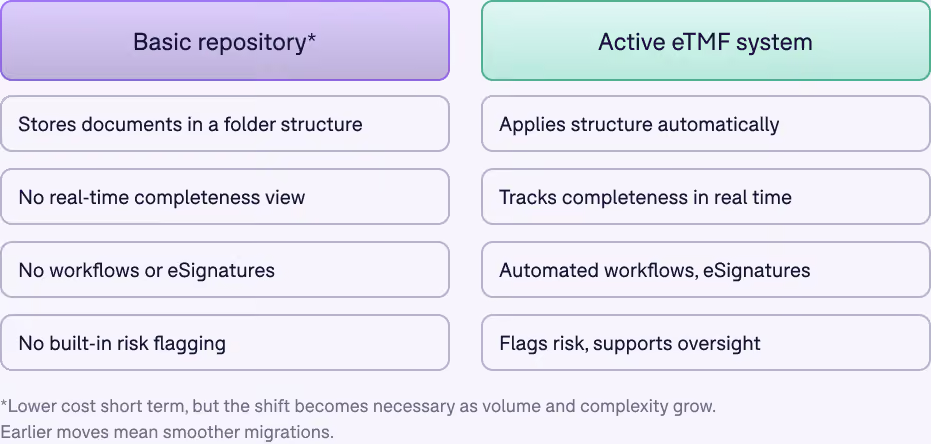
Comparison of Basic repository vs. Active eTMF System.

Understanding your hosting model

Cloud is the default for eTMF systems today. But not all cloud is the same, and the differences affect both your budget and your risk exposure.

Multi-tenant vs single-tenant

Ask whether the environment is multi-tenant, where your data shares infrastructure with other customers in a logically separated environment, or single-tenant, where you get a dedicated environment. Ask how tenants are segregated, and what that means for your data in practice.

Data residency

Ask where your data physically resides. Global trials often need documents stored in specific regions for legal or regulatory reasons, so confirm the vendor can meet your requirements before you sign.

Encryption and access

Ask whether encryption keys are unique to your organization or shared across the vendor's customer base. This affects how isolated your data really is, beyond the tenancy model alone.

Availability and disaster recovery

Get the vendor's availability commitment in writing, along with RPO (Recovery Point Objective) and RTO (Recovery Time Objective) figures. Ask for DR test evidence, not just a stated policy. A vendor that has actually tested their disaster recovery process can show you results, not only a plan.

Exit terms

Ask what happens to your content at contract end. Confirm export formats, how long your data stays accessible after termination, and whether full audit trails and metadata export alongside the documents themselves.

Budget considerations for cloud

Cloud pricing model

Understand how each pricing model scales. A per-user fee lets you scale up and down as operations shift. Other models make that harder.

Cloud models scale your IT budget more economically by nature. Whether you choose a dedicated cloud environment or a multi-tenant SaaS service, you will pay to set up the environment, validate it, and train your team. For SaaS, upfront costs run a fraction of an on-premise setup, since the vendor handles most of the technical maintenance.

eTMF SaaS subscriptions are typically priced per named seat, though some vendors charge per study or per site. Evaluate which model fits your business and choose vendors accordingly.

Staff and resource time

Cloud vendors take on most of the responsibility for managing the underlying technology, but your team still needs to stay involved during setup and onboarding to ensure the system gets configured and adopted correctly. The time investment runs far below an on-premise project, and your commitment during this phase sets up the system for long-term success.

What cloud pricing typically includes

Cloud eTMF pricing works differently from on-premise licensing. Rather than paying upfront for a license plus separate implementation, validation, and support costs, cloud vendors typically charge an initial setup fee, then bill system maintenance, support, and access as a predictable fee, monthly, annually, or per subscription term.

This structure offers two practical benefits. First, it spreads the cost of an enterprise-grade system over a longer period instead of requiring a large upfront outlay. Second, it reduces budget creep, since setup and onboarding costs are fixed rather than estimated.

Subscriptions typically include upgrades, so your team always has access to the latest version of the vendor's eTMF software as regulation and technology evolve, without a separate upgrade fee. Depending on your risk-based validation approach, your team may still choose to validate new features at each upgrade, which requires internal resource time.

When you request pricing for a cloud eTMF system, ask for a clear breakdown of what is bundled into the fee versus billed separately, and how much of your budget is required upfront versus over time.

Curious what an active eTMF system costs versus a basic repository?

Get a demo
A clinical expert reading her eTMF Connect dashboards on her computer
CHAPTER 6

Developing a business case for eTMF software

3 strategies for getting your finance team on board with eTMF

Electronic Trial Master File systems now rank among the fundamental pieces of a well-run clinical program. Not everyone sees this the same way. Finance teams sometimes view an eTMF as an added expense rather than a smart investment.

Preparing a proposal for budget approval presents a challenge, and the challenge grows when your finance team lacks context on your team's needs, pains, and goals. Here are a few strategies for easing that process and winning approval for an eTMF system.

1. Position your request around your CFO's vision

Getting finance on board comes easier when your pitch aligns with their priorities. Research your CFO's and finance team's strategies and goals for the coming year. These goals might include improving cross-functional efficiency, automating current processes, or increasing data security. Once you understand their goals, show how an eTMF system moves them closer to achieving those goals.

Finance teams work toward many high-level goals. Align your pitch with those goals and frame it accordingly, and approval gets easier.

Timing matters as much as alignment. Track the time of year financial planning happens and when budgets get decided. Present your case well before budgets are finalized. Too early, and your case may not register as a priority. Too late, and the budget is already allocated.

2. Explain the pain points

If your finance team lacks context, explain why an eTMF matters and what problems you are solving. TMF professionals live and breathe this work daily, and it's easy to forget that others don't share that depth of context.

Start by checking whether your finance team knows what a Trial Master File is. If not, explain it, and explain why proper management of records and data matters to the organization. These records can face inspection at any point, and they matter directly to the success of your clinical trials. Once your finance team understands this, walk through the pain points of your current process and how an eTMF addresses them.

If you work with paper, how do you share records with stakeholders across the globe? How does collaboration happen? How long does it take to retrieve a single record from a room full of paper files? These questions build your case. Paper-only processes mean no metadata, no traceability, no oversight, and limited accountability. Once your finance team grasps the depth of these issues, they grow more willing to help solve them.

3. Talk about investment, not cost

Cost dominates most conversations about software. Shift the conversation to investment instead. What return will you see? For a full breakdown of licensing, implementation, and infrastructure costs, see the Budget chapter earlier in this guide.

Beyond the line items, ROI includes opportunity cost: time saved, easier collaboration, and the confidence that your processes stay compliant. Opportunity cost resists a single tangible number, but it still plays a real and often decisive role in the value case.

Approach your finance team this way, and they focus on the money and time saved rather than the money spent.

Making a business case for eTMF software

What should a business case for an eTMF look like?

Your eTMF business case functions as your primary selling tool, the document you use to present your case for an eTMF system. The goal: give the reader everything needed to approve moving forward with finding the right eTMF solution.

Your business case should include these essential characteristics:

  • Clear and concise language

  • A strong selling tool
  • A big-picture overview

  • Reasons for proceeding
  • All associated costs, initial and recurring
  • A clear picture of how an eTMF benefits the organization

Building a business case takes time, especially when it requires research to back up your proposal. Some proposals deliver value efficiently. Others are too detailed and overwhelm the reader. The sections below give you a solid starting point for an effective proposal.

Section 1: What problem are you trying to solve?

Section 2: What is the scope of the project?

Section 3: Estimated costs and resources required

Section 4: Value and benefits of an eTMF solution

Section 5: Potential implications and issues

Section 6: Key project and system stakeholders

Section 7: Proposal assumptions

Section 8: Risks and controls

Section 9: IT and technological considerations
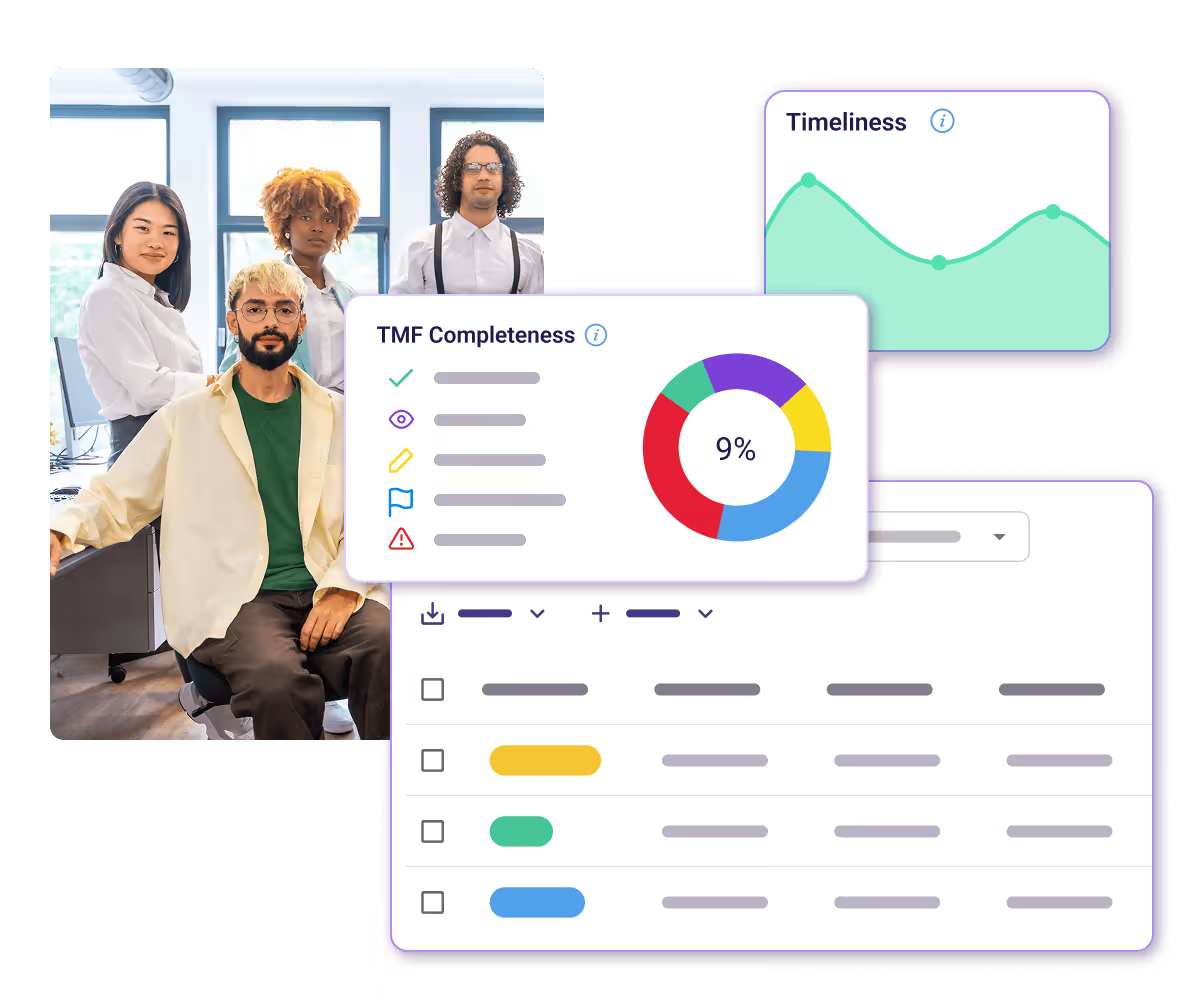
See what a real-time completeness view means for inspection readiness and where it saves your team time.

See eTMF Connect in action
eTMF Connect reports of TMF Completeness

Thanks for reading

Electronic Trial Master File systems are becoming a standard tool for clinical trial teams, not a nice-to-have. The bar for what counts as a modern eTMF keeps rising. Risk-based oversight and real-time completeness tracking are no longer forward-looking ideas. Vendors deliver them today, and AI-assisted indexing is emerging as a differentiator worth evaluating closely as you compare systems. As you move to a new eTMF, plan for where the industry is heading, not only where it has been.

This guide gives you a starting point for your evaluation. Reach out to Montrium with questions as you move through the process.

ABOUT MONTRIUM
Montrium is an Electronic Content Management software provider solely focused on the Life Sciences. We focus on delivering purpose-built systems to support clinical, regulatory and quality teams as they transform their organizations.

Email: info@montrium.com

Website: www.montrium.com
ABOUT eTMF CONNECT
Montrium's eTMF Connect solution helps life sciences companies better manage their clinical trial documentation. It has been designed using the TMF Reference Model, and centralizes and standardizes your clinical records enabling both sponsors and CROs to contribute and access important clinical documents and information in real time. eTMF Connect allows life sciences organizations to manage all of the essential documents required to be included in the Trial Master File/eTMF.

Everyone's talking about AI in life sciences. But we have questions. How are clinical quality professionals actually using AI today? What are they skeptical about? What do they need to move forward? We surveyed professionals across the clinical research ecosystem: QA leaders, clinical operations professionals, regulatory experts, and consultants at CROs, sponsors, and sites, primarily in North America and Europe.

The goal: understand the real state of AI adoption in clinical quality work and identify what's holding teams back.

Alison Robbins
Head of Marketing, Montrium